
Expedia: Hotels, Flights, Cars
ExpediaTravel & Local
4.892.21K Reviews
- Version
- 2026.42.0
- Installs
- 50.00M
- Age Rating
- Everyone
Screenshots





Our Review of Expedia: Hotels, Flights, Cars
 Analysis by Appyee
So, you’re thinking about planning your next big adventure, huh? Well, let me introduce you to Expedia: Hotels, Flights, Cars. This app is like having a personal travel agent right in your pocket. Whether you're jet-setting across the globe or sneaking away for a weekend getaway, this app has got you covered.
Before You Start Searching
Expedia is a free travel app from Expedia, aimed at people who would rather start with a trip plan than juggle separate searches for a stay, a flight, and a rental car. It sits in the travel and local category, and its broad booking scope is the main reason I would keep it on my phone. The app is rated for Everyone, and it has an average rating of 4.8 from around 1.4 million ratings. That level of adoption is reassuring, though it does not mean every booking will suit every traveler.
The useful question is not whether one app can cover a whole trip, but whether you want to compare those pieces together. If you already know your hotel and only need a flight, a specialist airline app can be a more direct place to check schedules and manage that carrier’s trip. If your plans are still taking shape, Expedia gives you a single place to explore the main travel components and weigh convenience against the extra time needed to compare choices carefully.
Your One-Stop Travel Shop
Alright, let’s dive into the juicy details. First off, the interface. It’s clean, intuitive, and just plain easy to use. You know how some apps make you feel like you need a PhD to navigate them? Not here. With Expedia, everything is organized into neat categories: hotels, flights, and car rentals. Just tap on what you need, and you’re off to the races.
Booking Made Easy
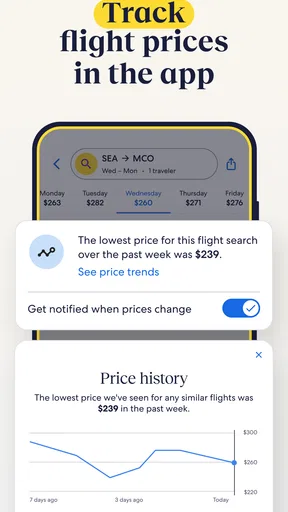
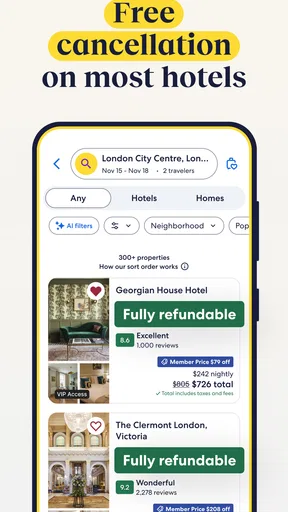
Booking a flight, a hotel, or even a car rental is as simple as pie. The app gives you a bunch of options, so you can easily compare prices, times, and amenities. Plus, if you’re someone who loves a good bargain (and who doesn’t?), you’ll appreciate the app’s special deals and discounts. It’s like hunting for treasure, but without the map.
For a more useful comparison, I would avoid choosing from the first appealing result. Set the dates and destination first, then compare the details that affect the actual trip: flight timing, hotel location, and what is included in the room or rental choice. A low-looking total is not automatically the best fit if it brings an inconvenient arrival time or puts you farther from where you need to be. Check the final booking details before confirming, especially when coordinating more than one part of a trip.
A realistic use is planning a short work visit: I can look for a flight that arrives early enough, choose a hotel near the meeting area, and decide whether a car is worth considering rather than assuming I need one. For a weekend away, I might compare the combined convenience of keeping travel choices together with the flexibility of booking each piece through a different provider. Expedia is most helpful when it makes that comparison easier, not when I treat the first bundle or discount as an automatic win.
Features That Stand Out
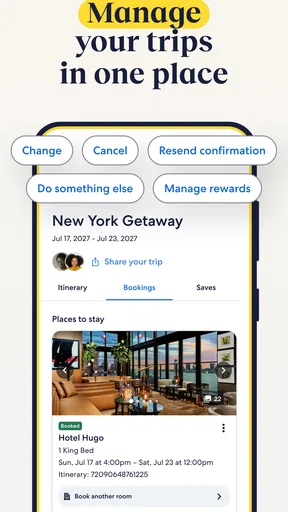
One of my favorite features is the itinerary manager. It keeps all your travel plans in one place, which means no more frantically searching through emails at the airport. Also, the app’s notifications keep you updated on flight changes, gate numbers, and even hotel check-in times. It’s like having a personal assistant whispering updates in your ear.
That shared itinerary is especially handy when a trip has several moving parts. I would check it before leaving home and again while traveling, rather than relying on memory or assuming every message will be easy to find later. Notifications can help draw attention to changes, but I still recommend checking the relevant airline or hotel directly when a detail is time-sensitive. Keeping one overview is convenient; it is not a reason to stop verifying the details that matter at the airport or front desk.
And hey, if you’re a rewards junkie, you’re in luck. The Expedia Rewards program lets you earn points on every booking, which you can later redeem for discounts. Traveling just got that much sweeter.
Rewards are most compelling if you expect to book through the same service again and can use the benefits on a future trip. I would compare the full price and conditions before letting points influence a decision: a reward is useful only if the booking itself works for your plans. If you travel infrequently, or have a preferred airline or hotel program you want to prioritize, the value of keeping everything in one place may be less important than booking directly with that provider.
When the App Is Under Pressure
The quick, category-based layout makes it easy to get started, but travel searches can involve a lot of decisions. Comparing several destinations, dates, and combinations is a heavier task than checking a single reservation. I would expect to spend more time reviewing results during that kind of planning, and I would avoid rushing through a booking simply because the first screens feel straightforward.
My practical approach is to do broad comparison first and narrow the choices before entering final details. If I am on a weak connection or in a hurry, I would focus on the itinerary information I need immediately and leave complicated changes or new bookings for a calmer moment. This is not a claim that the app behaves identically on every device or network; it is simply a sensible way to reduce friction when travel decisions are already time-sensitive.
Speed, Stability, and Recovery
Now, I won’t say it’s all sunshine and rainbows. Sometimes, the app can be a bit slow to load, especially when there are tons of users online. But hey, no app is perfect, right?
That occasional wait matters most when I am trying to compare many options or looking for a detail while already traveling. If a screen takes longer than expected, I would give it a moment rather than repeatedly tapping and risking confusion about whether a selection went through. Before leaving for a trip, it is also worth opening the itinerary while you have time to review it and keeping any essential confirmation details accessible in the way you normally manage travel records. That gives you a calmer fallback if connectivity or loading becomes inconvenient.
Expedia has been available since May 10, 2011, and its current version is 2025.50.0, with Android support beginning at OS 10. The app has over 50 million installs. Those figures make it a familiar, widely used option, but they cannot tell me how fast it will feel on a particular phone. I would keep the app updated and make sure the device has enough room for ordinary app use; travelers with older or constrained devices should also be prepared to use a browser or a provider’s own app if the experience feels sluggish.
Customer Support: Your Travel S.O.S.
We all know travel can sometimes throw curveballs your way. The good news? Expedia has a solid customer support system. Whether it’s a missed flight or a hotel booking gone wrong, they’ve got your back with 24/7 support. It's like having a lifeline during those stressful moments.
When a problem affects a booking, I would first identify which part of the trip is involved and have the reservation details ready before seeking help. A flight disruption, a hotel issue, and a car rental question may need different information, so a clear itinerary can make it easier to explain what has happened. For an urgent airline matter, contacting the airline directly may also be the more immediate route; for a reservation made through Expedia, its support is a natural place to ask about the booking itself.
Who Will Get the Most from It?
I would recommend the app to travelers who like having flights, accommodation, and car options together, especially when they are still deciding what kind of trip makes sense. It can also suit people who travel often enough to value a central itinerary and rewards. Those who prefer to book directly with one airline or hotel, need specialist advice, or already have a fixed routine across separate services may find little reason to move their whole process here.
Compared with searching each provider individually, the appeal is having the main trip pieces gathered in one place. The trade-off is that a single travel app should not replace checking the terms, location, and timing that matter to you. I would use Expedia to organize and compare, then take the time to make sure the final choice suits the real journey rather than just looking convenient on a small screen.
In conclusion, if you’re looking for a reliable travel companion to help you plan your trips, Expedia: Hotels, Flights, Cars is a solid choice. It’s user-friendly, packed with features, and can save you a pretty penny. So why not give it a whirl and see where your next adventure takes you?
Privacy and Permissions
See what permissions an app requests and how it handles your data.
- Identity
- find accounts on the device, add or remove accounts
- Calendar
- read calendar events plus confidential information, add or modify calendar events and send email to guests without owners' knowledge
- Contacts
- find accounts on the device
- Location
- approximate location (network-based), precise location (GPS and network-based)
- Phone
- read phone status and identity
- Photos/Media/Files
- read the contents of your USB storage, modify or delete the contents of your USB storage
- Storage
- read the contents of your USB storage, modify or delete the contents of your USB storage
- Camera
- take pictures and videos
- Microphone
- record audio
- Wi-Fi connection information
- view Wi-Fi connections
- Device ID & call information
- read phone status and identity
- Other
- view network connections, create accounts and set passwords, pair with Bluetooth devices, connect and disconnect from Wi-Fi, expand/collapse status bar, full network access, change your audio settings, read sync settings, run at startup, use accounts on the device, prevent device from sleeping, toggle sync on and off, read Google service configuration
Verdict
Strengths of Expedia: Hotels, Flights, Cars
- User-friendly interface for easy navigation.
- Comprehensive travel booking options.
- Offers exclusive deals and discounts.
- Allows itinerary management in one place.
- Supports multiple payment methods securely.
Limitations of Expedia: Hotels, Flights, Cars
- Occasional app crashes reported by users.
- Limited customer support response time.
- Higher fees on some bookings.
- Lacks some regional travel options.
- Offline functionality is limited.
Similar Picks in This Category
View All
Google Maps
Google LLC3.4

Google Maps Go
Google LLC4.1

Booking.com: Hotels & Travel
Booking.com Hotels & Vacation Rentals4.8

Google Earth
Google LLC3.8

Skyscanner Flights Hotels Cars
Skyscanner Ltd4.8

trivago: Compare hotel prices
trivago N.V.4.4
Frequently Asked Questions
What features does the Expedia app offer?
The Expedia app provides a comprehensive platform for booking hotels, flights, and rental cars. It also includes features like itinerary management, travel alerts, and exclusive mobile-only deals. Users can access their bookings offline and receive real-time notifications about flight changes or hotel updates.
Is the Expedia app free to use?
Yes, the Expedia app is free to download and use on both Android and iOS devices. While the app itself doesn’t charge a fee, keep in mind that booking services will incur costs, depending on the travel arrangements you choose to make through the app.
How secure is my personal and payment information on the Expedia app?
The Expedia app employs advanced encryption methods to protect your personal and payment information. It follows industry-standard security protocols to ensure that your data is safe during transactions. Always ensure your app is updated to benefit from the latest security enhancements.
Can I access customer service through the Expedia app?
Yes, the Expedia app offers customer support features, including the ability to contact support directly through the app. Users can access customer service 24/7 for assistance with bookings, cancellations, and other inquiries, ensuring a seamless and supportive travel planning experience.
Does the Expedia app offer rewards or loyalty points?
The Expedia app integrates with the Expedia Rewards program, allowing users to earn points for every booking made through the app. These points can be redeemed for discounts on future travel. The app also offers special deals and discounts exclusive to members, enhancing the value for frequent travelers.
